RAID Controller Upgrade
Saturday, January 31. 2026
It hasn't been an especially good couple of weeks. I've suffered couple hardware failures. One of my recent posts is about 13 year old SSD getting a retirement. There are other hardware failures waiting for a write-up.
A Linux gets security updates every once in a while. I have two boxes with a bleeding/cutting edge distro. The obvious difference between those is, that a "bleeding" edge is so new stuff, it doesn't let wounds heal. It literally breaks because of way too new components. A "cutting" edge is pretty new, but more tested. Concrete example of a bleeding edge would be ArchLinux and a cutting edge would be Fedora Linux.
My box got a new kernel version and I wanted to start running it. To my surprise, booting into the new version failed. Boot was stuck. Going to recover, I realized there was a physical storage device missing preventing automatic filesystem mount to happen, preventing successful boot. Rebooting again. This time eyeballing console display.
Whoa!
LSI 9260-4i
RAID status was missing from boot-sequence. This is what I was expecting to see, but was missing:
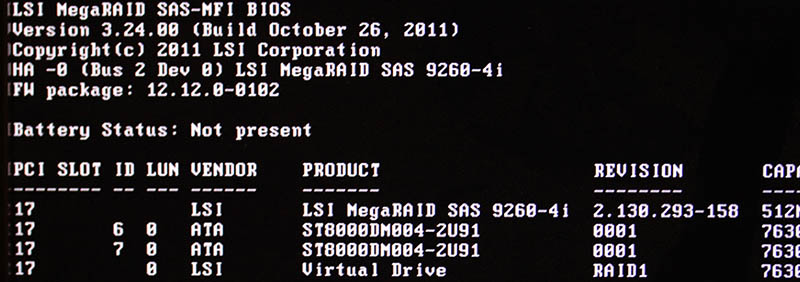
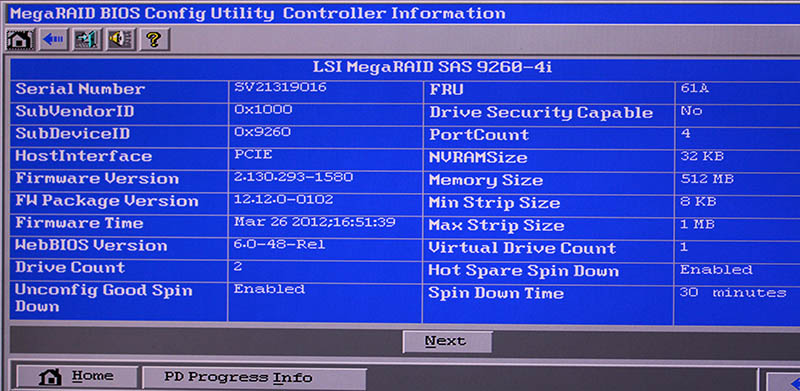
Hitting reset-button. Nothing.
Powering off the entire box. Oh yes! Now the PCIe-card was found, Linux booted and mounted the drive.
It was pretty obvious, any reliability the system may have had - was gone. From this point on, I was in a recovery mode. Any data on that mirrored pair of HDDs was on verge of being lost. Or, to be exact: system stability was at risk, not the data. On this quality RAID-controller from 2011, data saved to a mirrored drive has no header of any kind. Unplugging a drive from RAID-controller and plugging it into a USB3-dock makes the drive completely visible without tricks. Data not being lost at any point is a valuable thing.
This is what a LSI 9240-4i would look like:
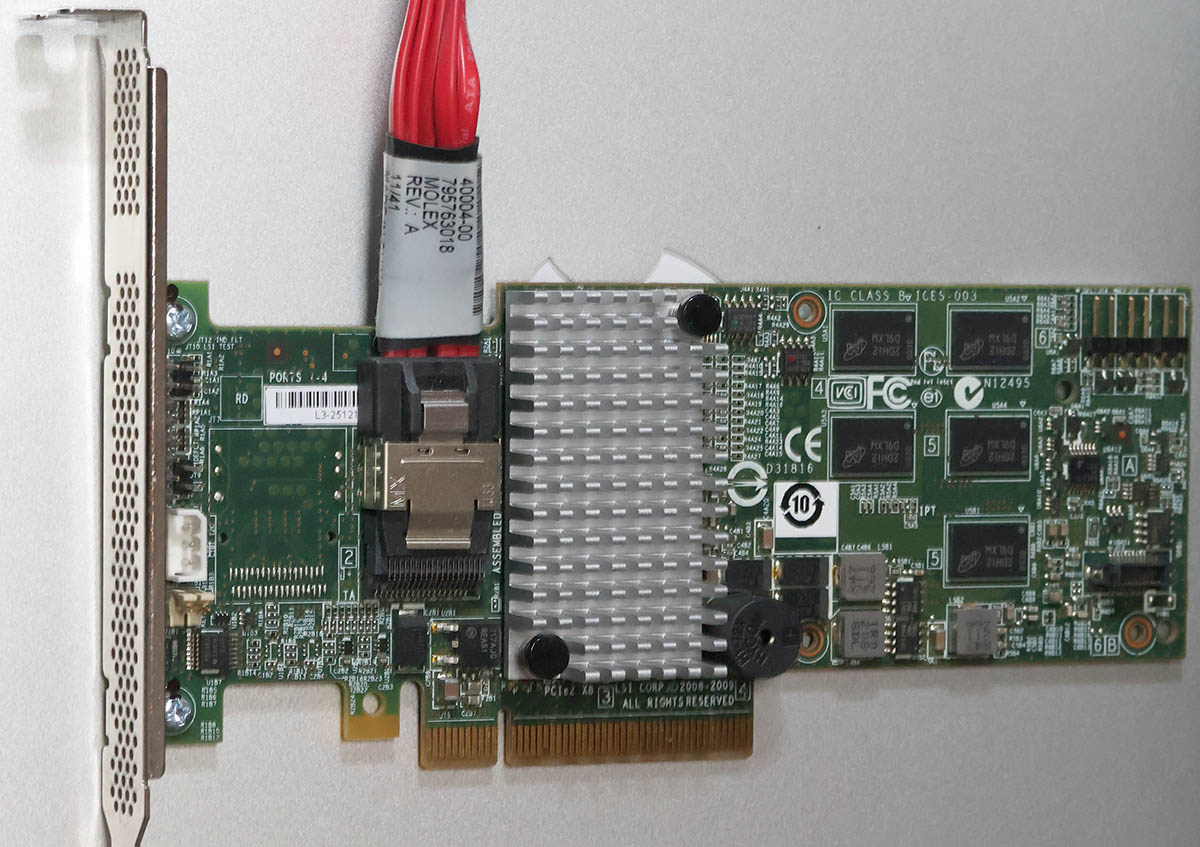
On a Linux, the card would look like (if UEFI finds it in boot):
kernel: scsi host6: Avago SAS based MegaRAID driver
kernel: scsi 6:2:1:0: Direct-Access     LSI      MR9260-4i        2.13 PQ: 0 ANSI: 5
kernel: sd 6:2:1:0: Attached scsi generic sg2 type 0
kernel: sd 6:2:1:0: [sdb] 11719933952 512-byte logical blocks: (6.00 TB/5.46 TiB)
LSI 9560-8i
Proper RAID controllers as brand new are expensive. Like 1000€ a piece. This is just a hobby, so I didn't need a supported device. My broken one was 14 years old. I could easily settle for an older model.
To eBay. Shopping for a replacement.
Surprisingly, 9240-4i was still available. I didn't want one. That model was End-of-Life'd years ago. I wanted something that might be still supported or went just out of support.
This is what I got:
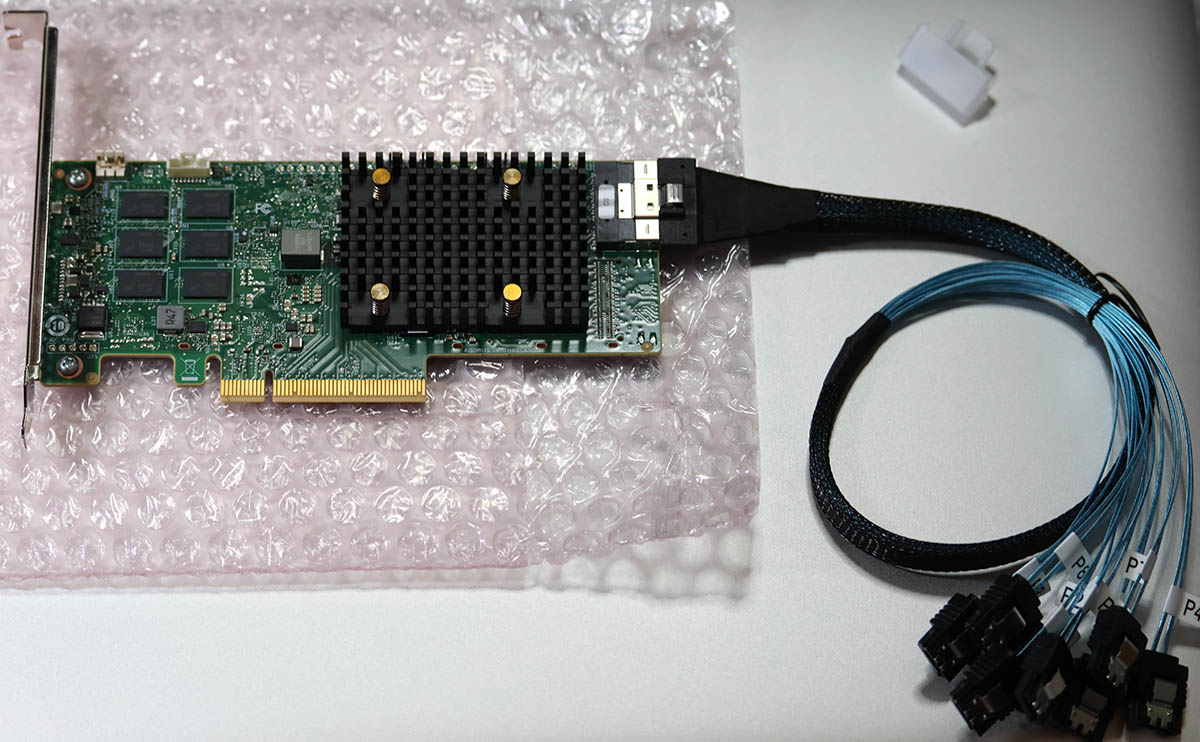
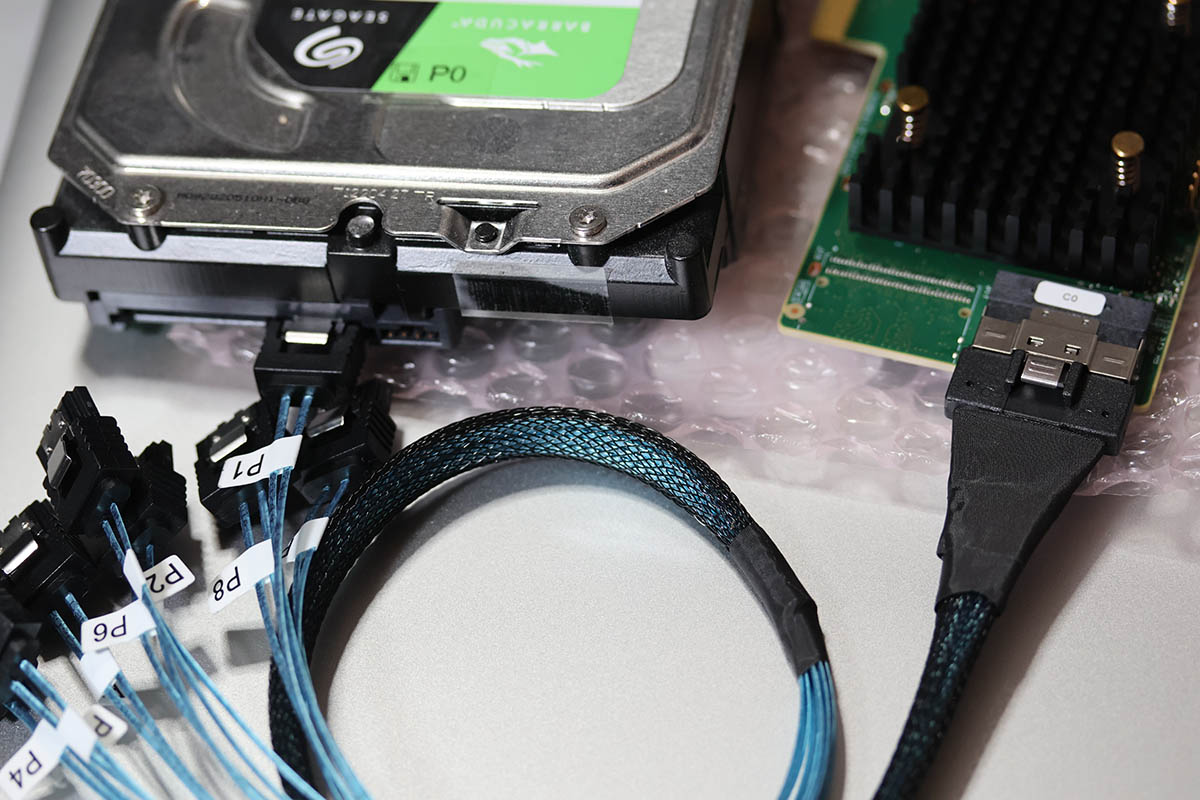
Lovely piece of hardware. Affordable even as second-hand PCIe -card.
On a Linux, the card shows as:
02:00.0 RAID bus controller: Broadcom / LSI MegaRAID 12GSAS/PCIe Secure SAS39xx
On 9560-8i Cabling
Boy, oh boy! This wasn't easy. This was nowhere near easy. Actually, this was very difficult part. Involving multiple nights spent with googling and talking to AI.
The internal connector is a single SFF-8654 (SlimSAS). Additionally, the card when you purchase one, doesn't come with any cabling with it. 9240-4i did have a proper breakout cable for its Mini-SAS SFF-8087. On the other end, there was a SAS/S-ATA -connector. As a SFF-8654 will typically be used to connect into a some sort of hot-swap bay, there a re multiple cabling options.
Unfortunately to me, SFF-spec doesn't have anything like that. But waitaminute! In the above picture, there is a SFF-8654 8i breakout cable with 8 SAS/S-ATA connectors in it. One is even connected to a HDD to demonstrate it working perfectly.
Well, this is where AliExpress steps up. Though, the spec doesn't say such thing exists, it doesn't mean that you couldn't buy such cable with money. I went with one vendor. It seemed semi-reliable with hundreds of 5-star transactions completed. Real, certified SFF-8654 -cables are expensive. 100+€ and much more. This puppy cost me 23€. What a bargain! I was in a hurry, so I paid 50€ for the shipping. And duty and duty invoicing fees and ... ah.
Configuring a replacment RAID-array
This was the easy part of the project. Apparently LSI/Broadcom -controllers write metadata to a drive. When I plugged in all the cables and booted the computer, it fould the previously configured array. RAID-configuration data IS stored to the drive somewhere, it's just not at a header of the drive. This is handy two-ways: unplugged drive looks like a regular drive, but on an appropriate controller the configs are readable.
Obviously the data on the drive was transferred away to an external USB-drive for safe-keeping. First I waited 12 hours for a degraded RAID-array to become intact again, then LVMing the data back.
A copy of drive was on an external drive connected via USB3. Recovery procedure with LVM:
- Partition the new RAID1-mirror as LVM with parted
- pvcreate the new physical device to make it visible into LVM
- vgextend the logical volume residing in external USB-drive to utilize newly created physical device. Note: Doing this does NOT move any data.
- pvmove:ing all data from external drive into internal drive. This forces logical volume to NOT use any extents on the drive. Result is moving data.
- Waiting. For 8 hours. This is a live system accessing the drive at all times.
- vgreduce:in the logical volume to stop using external drive.
- pvremove:in the external drive from LVM.
- Done!
On LSI/Broadcom Linux Software
This is what I learned:
- MegaRAID:
- Unsupported at the time of writing this blog post
- For RAID-controllers series 92xx
- My previous 9240 worked fine with MegaCli64
- StorCLI:
- Unsupported at the time of writing this blog post
- For RAID-controller series 93xx, 94xx and 95xx
- My 9560 worked fine with storcli64
- StorCLI2:
- Still supported!
- For RAID-controller series 96xx onwards
Running MegaCli64 with 95xx-series controller installed will make the command stuck. Like properly stuck. Stuck so well, that not even kill -9 does anything -stuck.
Running StorCLI2 with 95xx-series controller installed does nothing. There is a complaint, that no supported controller was found on the system. Nothing stuck. Much less dangerous than MegaCli64.
Status
On boot:
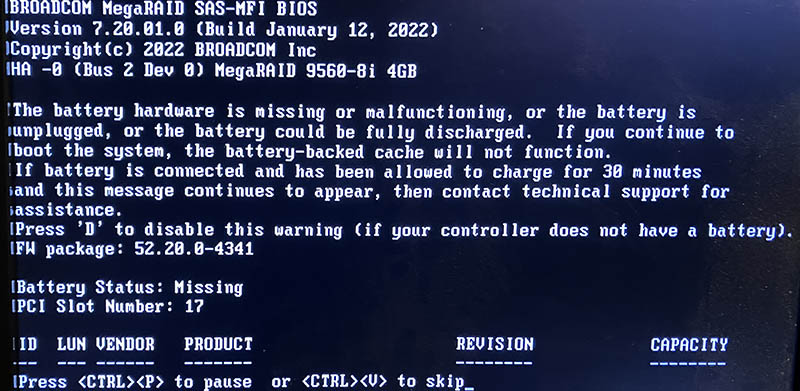
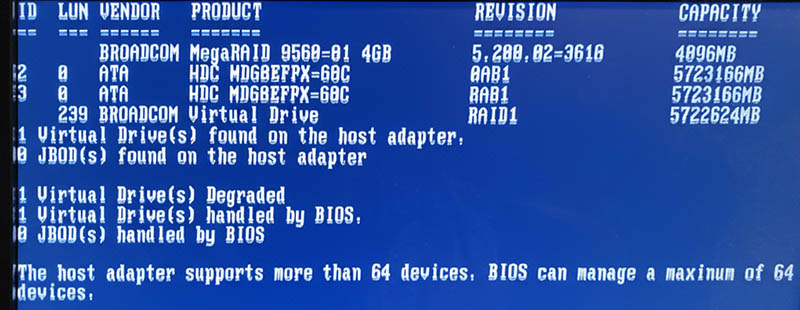
Note the complaing about battery backup:
The battery hardware is missing or malfunctioning, or the battery is unplugged, or the battery could be fully discharged. If you continue to boot the system, the battery-backed cache will not function.
If battery is connected and has been allowed to charge for 30 minutes sand this message continues to appear, then contact technical support for lassistance.Battery Status: Missing
On Linux prompt by running command storcli64 /c0 /vall show:
CLI Version = 007.3007.0000.0000 May 16, 2024
Operating system = Linux 6.16.3-100.fc41.x86_64
Controller = 0
Status = Success
Description = None


Virtual Drives :
==============

-------------------------------------------------------------
DG/VD TYPE  State Access Consist Cache Cac sCC     Size Name
-------------------------------------------------------------
0/239 RAID1 Optl  RW     Yes     RWTD  -   ON  5.457 TB
-------------------------------------------------------------

VD=Virtual Drive| DG=Drive Group|Rec=Recovery
Cac=CacheCade|OfLn=OffLine|Pdgd=Partially Degraded|Dgrd=Degraded
Optl=Optimal|dflt=Default|RO=Read Only|RW=Read Write|HD=Hidden|TRANS=TransportReady
B=Blocked|Consist=Consistent|R=Read Ahead Always|NR=No Read Ahead|WB=WriteBack
AWB=Always WriteBack|WT=WriteThrough|C=Cached IO|D=Direct IO|sCC=Scheduled
Check Consistency
Finally
Hopefully I don't need to touch these drives for couple years. In -23, I upgraded the drives. Something really weird happened in January this year and I had to replace the replacement drives. As I wrote in the article, the drives were in perfect condition.
Now I know, the controller started falling apart. I simply didn't realize it at the time.

